Calculation, notation, and calculator
A guide to avoiding errors in rearrangement, parentheses, scientific notation, rounding, and calculator input.
Rearrange without losing information
Rearranging means applying the same valid operation to both sides while preserving restrictions and possible solutions.
Safe sequence
- Work symbolically first.
- Simplify only genuinely equivalent terms.
- Isolate the term containing the unknown.
- Apply inverse operations to both sides.
- State restrictions introduced by denominators, roots, or logarithms.
- Substitute the rearranged result into the original equation.
Example:
[
\quad\Longrightarrow\quad
\quad\Longrightarrow\quad
]
when denotes speed. If an algebraic component is solved from , the branches may appear and must be selected from the physical conditions.
Do not “move” terms and change signs as a memorized rule: identify the operation applied. This prevents lost exponents, inverted fractions, and cancellation across sums.
Parentheses and operation precedence
A calculator follows syntax rules; it does not interpret your intention. Make the mathematical structure visible.
Usual order
- parentheses and functions;
- powers and roots;
- multiplication and division;
- addition and subtraction.
Operations at the same level are normally evaluated from left to right, but an interface may use different conventions for fractions, powers, or implicit multiplication.
Expressions that are not equal
[
]
To enter
[
]
write an unambiguous structure equivalent to “(v^2-v0^2)/(2*a)”. Enclose compound numerators, denominators, and exponents.
Cancel correctly
Only factors cancel, not terms in a sum. In , factor first: , provided .
If a line contains several slashes or consecutive minus signs, rewrite it as a fraction before calculating.
Powers, roots, and scientific notation
Exponents must apply to the complete intended object.
[
]
Also:
[
]
Scientific notation
Normalize as , with . When multiplying, multiply coefficients and add exponents; when dividing, divide coefficients and subtract exponents.
The EXP or EE key normally enters “times ten to the power.” For , enter “6.02 EXP 23,” not “6.02 × 10 EXP 23.”
Sign and power
[
]
A fractional exponent, even root, or logarithm may restrict the real domain. If the calculator reports an error, check the domain and parentheses before blaming the tool.
Enter an expression into the calculator
The calculator must receive a faithful translation of the symbolic expression, with values already converted and compatible units.
Before pressing equals
- estimate the sign, unit, and order of magnitude;
- check the angular mode: DEG or RAD;
- identify the parentheses required by each numerator, denominator, and function;
- use memory or variables for repeated values;
- confirm the decimal separator accepted by the interface;
- do not copy units into a field expecting numbers only.
Enter in meaningful blocks
For a long expression, first calculate meaningful subexpressions and record them. Do not split it in a way that lets rounding or lost parentheses alter the formula.
After entering it:
- reread the complete expression on screen;
- compare it with the symbolic version character by character;
- repeat with a simple case whose result you know;
- preserve the input or a screenshot if the calculation must be reproducible.
Phyxio's Basic Calculator supports everyday operations, while specific calculators relate variables from a leaf. Always verify the unit required by each field, the variable being calculated, and the assumptions used. An instant output does not guarantee correct input.
Rounding and intermediate precision
Rounding too early can shift the final result, especially with many operations, powers, or cancellations.
Strategy
- Keep the exact symbolic value where possible.
- Retain several extra digits in intermediate steps.
- Store the full value in memory and round only when reporting.
- Match final figures to the uncertainty or precision of the inputs.
For example, replacing with at the start is not equivalent to rounding the final result. Nor should you repeatedly copy a shortened output when the calculator retains more digits internally.
Accuracy and precision
More decimal places do not make a result more accurate. A calculator may show ten digits even when the data justify only three.
Avoid two extremes:
- rounding every line until an appreciable error accumulates;
- reporting every displayed digit and implying nonexistent precision.
If two routes differ only in their last digits, repeat them without intermediate rounding. If the difference is large, first look for a structural, unit, or input error.
For experimental results, use the uncertainty to determine the final decimal place.
Diagnosis and inverse checking
Do not repeat the entire calculation in the same way. Use tests that isolate the type of fault.
| Signal | Priority check |
|---|---|
| Difference by | prefixes, EXP, exponents, and decimal point |
| Opposite sign | parentheses, axes, and signs entered twice |
| Close but different result | rounding, constants, and coefficients |
| Domain error | root, logarithm, denominator, and angular mode |
| Huge or tiny result | parentheses, inverted fraction, and units |
| Only one root works | conditions, domain, and extraneous solutions |
Independent checks
- Substitute the rearranged expression into the original equation.
- Repeat symbolically or with a simple value.
- Calculate in reverse to recover an input.
- Use an equivalent formulation.
- Compare the unit, estimate, and limiting case.
- Enter the full expression a second time; do not automatically reuse the history.
Minimum record
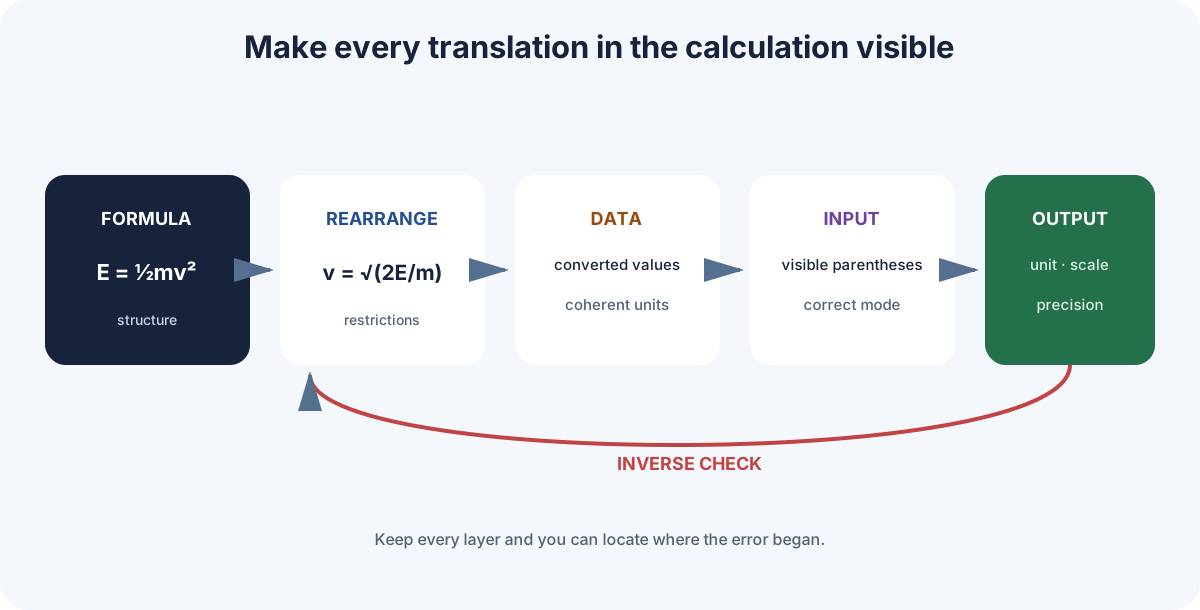
Keep the symbolic formula, converted values, entered expression, and unrounded output. You can then locate whether the error began during formulation, rearrangement, substitution, typing, or reporting.
If you ask Phyxio AI to review the calculation, include those four layers. Check its transformations by substituting them into the original expression; a convincing explanation may still contain an algebraic error.